The Day I Realized I Was Flying Blind
There was a period when I was running campaigns and checking analytics every morning, yet something always felt incomplete. Traffic numbers were there, bounce rates were there, but the real story — what people actually did on the site — was missing. It was like owning a store and only knowing how many people walked in, but not what they touched, what they considered, or what made them leave.
The turning point came when I installed Google Tag Manager for the first time. Within a few days, I wasn’t just seeing visitors; I was seeing behaviors — button clicks, scroll depth, checkout attempts, abandoned carts. It felt less like guessing and more like finally turning on the lights in a dark room.
The First Steps Felt Technical — But the Logic Was Human
Opening Google Tag Manager for the first time can feel intimidating. Containers, workspaces, versions — it looks like an aircraft cockpit. But once the logic clicks, it becomes surprisingly approachable.
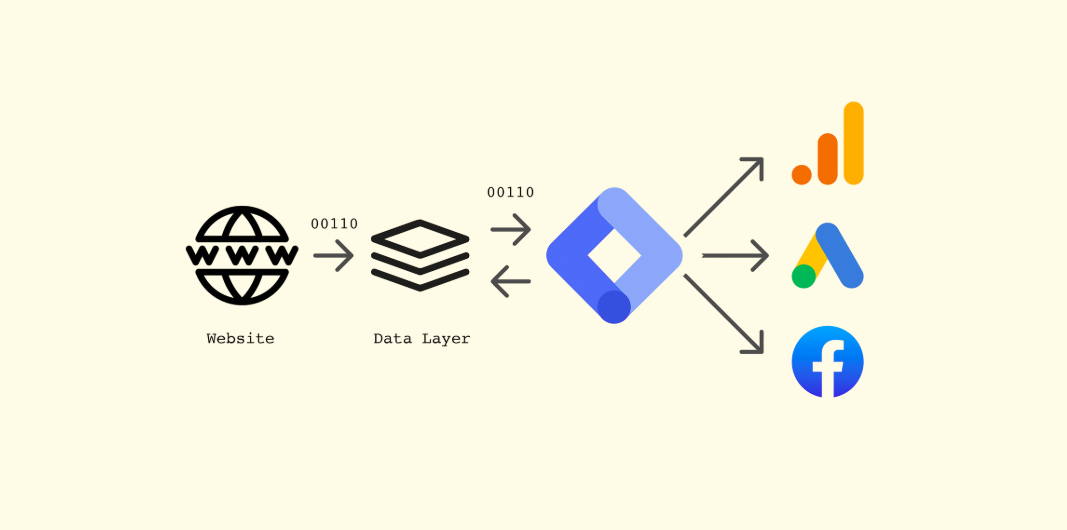
You place a single container snippet on your website, and from there, you manage tracking without constantly editing the site’s core code. It shifts the workflow from “ask a developer every time” to “configure and test.” The real power isn’t technical complexity; it’s autonomy and speed.
What made it easier for me was reframing setup into simple questions: What do I want to measure? Where does it happen? When should it count? Those questions shaped every tag and trigger afterward.
Tags, Triggers, and the Moment They Start Making Sense
The breakthrough moment was realizing that tags and triggers are essentially conversations between intention and behavior.
A tag is what you want to record or send — an analytics event, an ad conversion, a heatmap session. A trigger is when it should fire — a click, a page load, a form success message, a purchase confirmation. Instead of hard-coding logic, you’re defining conditions.
I still remember setting a trigger tied to a “Thank you for your order” page and seeing the first real-time conversion event fire. It wasn’t just data; it was confirmation that the system was listening at the exact moment success happened. From there, experimentation became natural — refining triggers, testing edge cases, and improving accuracy felt more like tuning an instrument than writing code.
The Quiet Workhorses: Common eCommerce Tags
As projects grew, certain tags kept appearing again and again. Not because they were trendy, but because they answered practical business questions:
- Google Analytics / GA4 — the backbone for page views, events, funnels, and enhanced eCommerce tracking.
- Google Ads Conversion & Remarketing — connects on-site actions with ad performance and audience building.
- Microsoft Clarity — heatmaps and session recordings that reveal how users actually move and hesitate.
- Meta (Facebook) Pixel — tracks purchases, add-to-carts, and fuels social ad optimization.
- LinkedIn Insight Tag — valuable for B2B conversions and professional audience retargeting.
- Pinterest / TikTok Pixels — increasingly relevant for visual and short-form commerce channels.
- Hotjar or similar UX tools — surveys, feedback widgets, and behavioral recordings.
- Affiliate / Partner Tags — ensuring referral attribution and commission accuracy.
These tags aren’t just scripts; they represent different lenses on the same user journey. Analytics shows the what, ad pixels show the value, and behavior tools show the how. Together, they create a fuller narrative rather than isolated numbers.
Why It Quietly Changes How You Design and Decide
Stepping back, Google Tag Manager isn’t only about measurement; it reshapes how decisions are made. When you can observe which buttons are ignored or which sections users scroll past, layouts stop being static guesses and start becoming living experiments.
It also changes collaboration. Designers, marketers, and developers share a common layer of insight. Conversations shift from “I think users prefer this” to “We noticed users interact more with this.” The difference is subtle but powerful — opinions become informed perspectives.
There’s a psychological shift too. Knowing you can measure accurately makes experimentation safer. You become more willing to test call-to-action placement, refine hierarchy, or adjust checkout flows because outcomes are visible rather than speculative.
What Stays With Me
Google Tag Manager taught me that visibility changes everything. Without it, digital work can feel like educated guesswork; with it, it becomes guided iteration. It doesn’t replace creativity or intuition — it gives them feedback.
Now, whenever I approach a website, I think of Tag Manager as the invisible control room humming quietly behind the interface. Users never see it, yet it shapes how clearly we understand their journey. In the end, it’s not about collecting more data; it’s about capturing the right signals so decisions feel grounded instead of hopeful.

Johnson Wang
Digital Marketing Manager & Software Developer with 10+ years of experience helping businesses grow through strategic marketing and custom development solutions.
Contact Me